CaseCam
AI-Powered Body Cam Review
Reduce 10+ hours of manual footage review to under 30 minutes with AI-powered transcription, analysis, and legal insights.
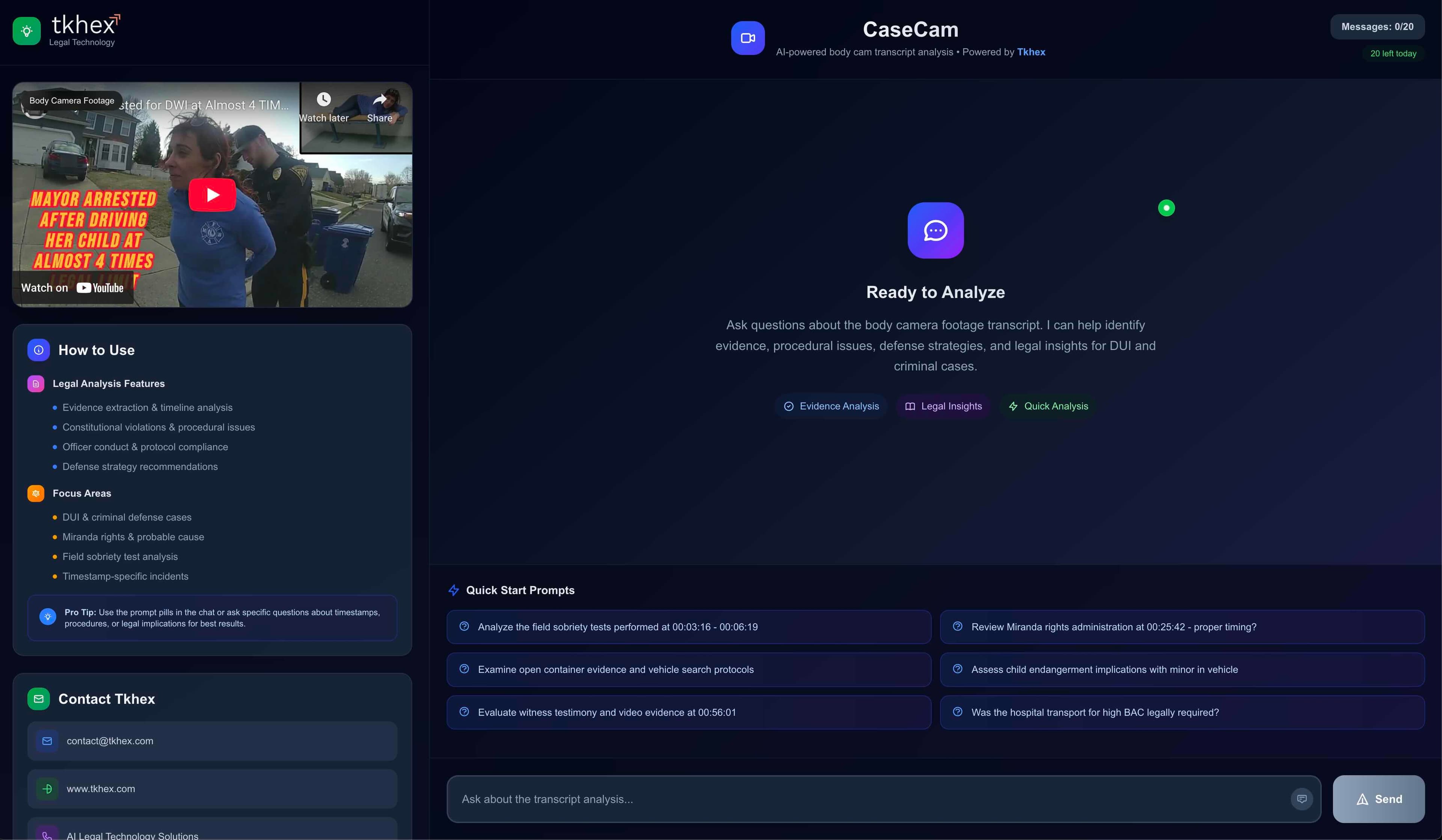
Transform Body Camera Footage Review
CaseCam is an AI-powered legal co-counsel that reviews police body cam footage using advanced AI technology. What used to take attorneys 10+ hours of manual review can now be completed in under 30 minutes.
How to Use
Simply upload or paste your body camera footage transcript into CaseCam. The AI will analyze the entire transcript, identifying key evidence, procedural issues, and legal insights.
Pro Tip
Use the prompt pills in the chat or ask specific questions about timestamps, procedures, or legal implications for best results.
Legal Analysis Features
Comprehensive AI-powered analysis for your legal cases
Evidence Extraction
Automatically extract and organize key evidence from body cam footage with timeline analysis
Constitutional Violations
Identify constitutional violations and procedural issues that could strengthen your defense
Officer Conduct Analysis
Review officer conduct and protocol compliance throughout the interaction
Defense Strategy
Receive AI-powered defense strategy recommendations based on the full analysis
Focus Areas
Specialized analysis for key legal scenarios
DUI & Criminal Defense Cases
- Field sobriety test analysis
- Miranda rights & probable cause review
- Timestamp-specific incident analysis
Quick Start Prompts
Example Prompt
“Analyze the field sobriety tests performed at 00:03:16 – 00:06:19”
Example Prompt
“Review Miranda rights administration at 00:25:42 – proper timing?”
Example Prompt
“Examine open container evidence and vehicle search protocols”
Watch CaseCam in Action
See how CaseCam transforms body cam footage review
Three Ways to Analyze
Choose the analysis method that works best for your case
Evidence Analysis
Comprehensive extraction and organization of all evidence from the body cam footage with detailed timeline analysis
Legal Insights
AI-powered identification of constitutional violations, procedural issues, and defense strategy recommendations
Quick Analysis
Fast, targeted analysis using prompt pills or specific questions about timestamps, procedures, or legal implications
CaseCam versus watching it
Your alternative to CaseCam usually isn't other software. It's someone sitting down and watching the footage.
| Watching it | With CaseCam | |
|---|---|---|
| Time floor | A recording cannot be watched in less than its own length, or half that at double speed. Ten hours of footage means at least five hours of someone watching. | Processing runs in the background. You start asking questions rather than starting a stopwatch. |
| Finding a specific fact | Scrubbing back and forth, or watching again, because the thing you need was ninety seconds in hour seven. | Ask directly and get the timestamp. Asking a second question costs seconds, not another pass. |
| Confirming something is absent | Proving a negative means watching all of it, carefully, and still not being certain you did not blink. | Ask whether it happened. CaseCam reports absence rather than inventing an answer. |
| Multiple cameras | Each additional officer multiplies the footage. Five body cams on one incident is five times the viewing. | Upload them together and ask one question across all of them. |
| Speeding up | Playing at double speed halves the time and trades away thoroughness on audio that is already hard to hear. | No trade. The transcript is searched in full regardless of how long the recording runs. |
Every answer has to be checkable
An assertion about evidence that you cannot verify against the record is worse than no answer. These are the decisions that follow from taking that seriously.
- Answers about video cite the timestamp they came from.
- Transcripts are indexed with their time markers intact, and answers are required to carry them. An assertion about evidence that you cannot jump to and check is worse than no answer, because it invites reliance it has not earned.
- The sources list shows what the answer cited, not everything it read.
- Retrieval routinely pulls three documents to answer a question that rests on one. Listing all three under a heading reading "Sources" implies the answer relied on them, and in a legal product that is a claim about reliance. Answers are filtered to the documents actually cited before the list is shown.
- The model is instructed never to invent a source number.
- It can only cite from the source key it was given, and citations to anything else are stripped rather than displayed. Fabricated references are the best-documented failure mode of language models in law, and the answer to it is mechanical, not hopeful.
- Case citations, statutes, and dates are never to be fabricated.
- Where the model does not know, it is instructed to say so rather than produce something plausible. Where a jurisdiction cannot be determined from the documents, it is instructed to flag it as unknown rather than guess.
- Retrieval combines keyword and semantic search.
- Semantic search alone misses exact terms — a statute number, a name, a specific phrase from the record. Keyword search alone misses the same idea said differently. Both run, and the results are fused.
- Every query is scoped to a single matter.
- Documents are indexed per matter, and a question asked in one case cannot reach another firm’s material or another matter’s. Isolation is enforced at the query, not by convention.
What CaseCam doesn't do
Every tool has edges. Here are ours, so you can decide with the whole picture rather than discovering them mid-case.
CaseCam does not replace your review of the record.
It surfaces candidate moments and answers questions with timestamps so you can go straight to them. Deciding what matters is legal judgment, and that stays with you.
CaseCam does not give legal advice or form legal conclusions.
It reports what is in the footage. Whether a stop was lawful, whether testimony is impeachable, and what to do about it are yours to determine.
CaseCam is not a certified transcript or a substitute for one.
Transcription is a working tool for finding and citing moments. Where the record requires a certified transcript, obtain one.
CaseCam does not read proprietary CCTV and DVR container formats.
Body cam exports from major vendors are standard video files and work today. Older surveillance systems often ship proprietary containers with bundled players; converting those to a standard format first is currently required.
What CaseCam can read
Video formats
- ✓MP4
- ✓MOV
- ✓AVI
Body camera sources
- ✓Axon Body 3 and Axon Body 4
- ✓Axon Evidence.com exports
Axon Body 3 and 4 record and export standard .mp4 files, so Evidence.com downloads work without conversion.
Got footage in a format not listed? Tell us what you're working with.
What CaseCam looks like in your practice
The footage is the same. The questions you need answered are not.
Public Defenders
Body cam review when the caseload decides your calendar
Discovery volume should not be the reason a case gets a shallow look. Query the footage instead of watching it.
Criminal Defense
Find the suppression issue before the motion deadline
The facts a motion turns on are usually in the recording. The problem is finding them, and citing them precisely.
DUI Defense
Every instruction, every test, on the record
DUI cases turn on procedure. Body cam captures whether the procedure was followed, if you can find the moment.
Civil Rights
Compare what was reported against what was recorded
When several officers were present, the discrepancy that matters is rarely in the first recording you open.
Plaintiff & Personal Injury
The scene, before anyone’s account settled
For plaintiff firms, responding officer footage captures what people said in the first minutes. That is rarely what they say later.
Common questions
- What software lets attorneys review police body cam footage with AI?
- CaseCam, by CaseSuite.ai, is built for attorneys reviewing police body cam footage. Rather than watching footage end to end, an attorney uploads it and asks questions in plain language; CaseCam answers and cites the timestamp for each answer so it can be checked against the source.
- Can I ask questions about body cam footage instead of watching all of it?
- Yes. CaseCam indexes the footage so you can query it directly — whether a reason for the stop was stated, whether Miranda was given and when, whether an account changed. Each answer carries a timestamp pointing to the moment in the recording it came from.
- Does CaseCam train AI models on my body cam footage?
- No. CaseSuite never uses customer footage, transcripts, or case data to train or fine-tune any model. Video and audio are processed inside CaseSuite infrastructure and never leave it; only derived text transcripts are sent to a language model provider.
- What happens if I ask CaseCam about something that is not in the footage?
- CaseCam reports that it is not present rather than inventing an answer. This matters in evidence work because proving a negative — that Miranda was never given, that consent was never requested — is frequently the point of the review.
- Can CaseCam handle multiple body cameras from the same incident?
- Yes. Several videos from one incident can be uploaded and queried together, so a question can be answered across all of them at once. Note that CaseCam does not currently align separate sources onto a single synchronized timeline.
- Does CaseCam work with Axon Evidence.com exports?
- Yes. Axon Body 3 and Axon Body 4 record and export standard .mp4 files, and CaseCam reads MP4, MOV, and AVI, so Evidence.com downloads work without conversion. Proprietary CCTV and DVR container formats are not currently supported.
- Is CaseCam a replacement for reviewing evidence myself?
- No. CaseCam surfaces candidate moments and answers questions with timestamps so you can go straight to them, but deciding what matters is legal judgment and stays with the attorney. It does not give legal advice or draw legal conclusions.
See it on your kind of footage
Tell us what you're working with and we'll show you CaseCam handling something like it.
Ready to Transform Your
Body Cam Review Process?
Join attorneys who are saving 10+ hours per case with CaseCam's AI-powered analysis.
Need AI legal technology for your firm?
Contact Us